AYNI ÖLÇÜTLERLE YAN YANAFarkları gör.
Farkları gör.
İhtiyacına göre karar ver.
İki ila beş modelin kaynaklı teknik özellikleri ve güncel mağaza teklifleri.
En az iki model seç.
Üretici model kodu ve sürümü dahil, aynı alanları karşılaştıracağız.
ISO baskı hızı ile taslak modundaki azami hız farklı ölçümlerdir. Otomatik ve elle çift taraflı baskıyı ayır. Kartuş, toner ve baskı kafası teklifleri yazıcı fiyatı olarak gösterilmez; sarf malzemesi ve kurulum gereksinimini üreticiden incele. Dar ekranda tabloyu sağa kaydırabilirsin.
| Özellik / kaynak | 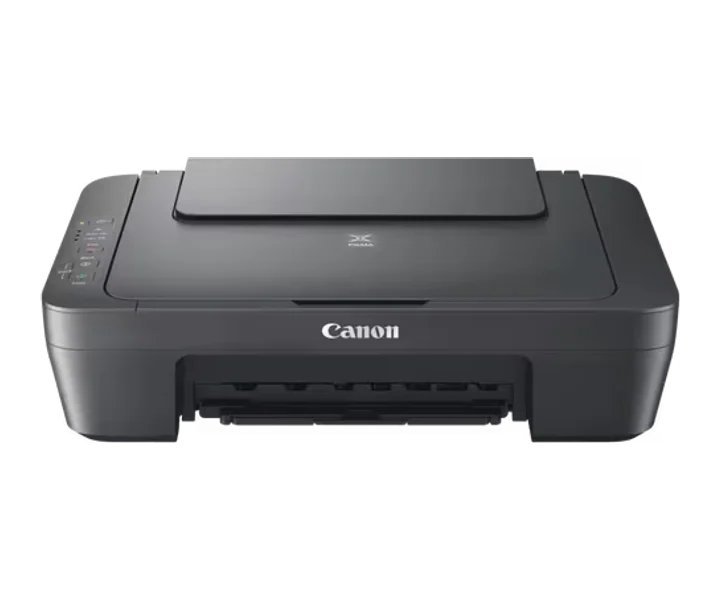 Canon PIXMA MG2556SPIXMA MG2556S |
|---|---|
| Güncel mağaza fiyatı | Güncel teklif yokFiyat tahmin edilmez.Mağaza tekliflerini gör ↗ |
| Üreticinin model / aile bilgisi | PIXMA MG2556SÜretici kaynağı ↗ |
| İşlevler | Print, Copy, ScanÜretici kaynağı ↗ |
| Baskı teknolojisi | 2 FINE Cartridges (Black and Colour)Üretici kaynağı ↗ |
| Baskı hızının ölçüm koşulları | Mono Print Speed: Approx. 8.0 ipm; Colour Print Speed: Approx. 4.0 ipmÜretici kaynağı ↗ |
| Üreticinin belirttiği baskı çözünürlüğü | Up to 4800 x 600 dpiÜretici kaynağı ↗ |
| Çift taraflı baskı yöntemi | Manual operationÜretici kaynağı ↗ |
| Uyumlu kartuş / toner / mürekkep | PG-545 (Black) CL-546 (Colour)Üretici kaynağı ↗ |
| Sarf malzemesi verimi | A4 colour documents printing Black: 180 pages Black XL: 400 pages Colour: 180 pages Colour XL: 300 pagesÜretici kaynağı ↗ |
| Desteklenen kağıt boyutları | Plain paper: A4, A5, B5, Letter, Legal Photo paper: 10x15cm, 13x18cm Envelopes: DL, COM10Üretici kaynağı ↗ |
| paper Types | Plain Paper Envelopes Photo Paper Plus Glossy II (PP-201) Photo Paper Glossy "Everyday Use" (GP-501)Üretici kaynağı ↗ |
| paper Weight | Plain paper: 64 - 105 g/m² Canon photo paper: up to 275 g/m²Üretici kaynağı ↗ |
| Tarayıcı türü | CIS flatbed photo and document scannerÜretici kaynağı ↗ |
| Optik tarama çözünürlüğü | 600 x 1200 dpiÜretici kaynağı ↗ |
| scan Speed Conditions | Approx. 14 secondsÜretici kaynağı ↗ |
| copy Speed Conditions | sFCOT: Approx. 31 seconds sESAT: Approx. 1.6 ipmÜretici kaynağı ↗ |
| supported Os | Windows 11 Windows 10 (32-bit) Windows 10 (64-bit) Windows 8.1 (32-bit) Windows 8.1 (64-bit) Windows 8 (32-bit) Windows 8 (64-bit) Windows 7 (32-bit) Windows 7 (64-bit) Windows Vista (32-bit) Windows Vista (64-bit) Windows XP (32-bit) Note: For Windows, .NET Framework 4 or .NET Framework 4.5 is required. For Windows XP, XPS Essentials Pack is required. Mac OS X v10.7.5 to Mac OS X v10.14 (Sonoma)Üretici kaynağı ↗ |
| display Type | No displayÜretici kaynağı ↗ |
| Güç kaynağı türü | AC 100-240V, 50/60HzÜretici kaynağı ↗ |
| Güç ve enerji koşulları | Off: Approx. 0.4 W Standby (connected to PC via USB): Approx. 1.0 W (scanning lamp off) Standby (all ports connected): Approx. 1.0 W (scanning lamp off) Time to enter Standby mode: 7 minutes Copying: Approx. 9 WÜretici kaynağı ↗ |
| Kasa ölçüleri | 426 x 306 x 145mmÜretici kaynağı ↗ |
| Ağırlık | 3.500 gÜretici kaynağı ↗ |
| Üreticinin ayrıntılı teknik tablosu | Model Numbers: PIXMA MG2556S · Functions: Print, Copy, Scan · Print Resolution: Up to 4800 x 600 dpi · Print Technology: 2 FINE Cartridges (Black and Colour) · Mono Print Speed: Approx. 8.0 ipm · Colour Print Speed: Approx. 4.0 ipm · Two Sided Printing: Manual operation · Standard Ink Cartridges: PG-545 (Black) CL-546 (Colour) · Optional XL Ink Cartridges: PG-545XL (Black) CL-546XL (Colour) · Cartridge Yield (Plain Paper): A4 colour documents printing Black: 180 pages Black XL: 400 pages Colour: 180 pages Colour XL: 300 pages · Paper Types: Plain Paper Envelopes Photo Paper Plus Glossy II (PP-201) Photo Paper Glossy "Everyday Use" (GP-501) · Maximum Paper Input: Rear tray: Max. 60 sheets (plain paper) · Paper Sizes: Plain paper: A4, A5, B5, Letter, Legal Photo paper: 10x15cm, 13x18cm Envelopes: DL, COM10 · Paper Weight: Plain paper: 64 - 105 g/m² Canon photo paper: up to 275 g/m² · Scanner Type: CIS flatbed photo and document scanner · Scanner Resolution (Optical): 600 x 1200 dpi · Line Scanning Speed: Approx. 14 seconds · Scanning Depth (Input / Output): Colour: 48 bit / 24 bit Greyscale: 16 bit / 8 bit · Maximum Document Size: 216 x 297 mm · Copy Speed: sFCOT: Approx. 31 seconds sESAT: Approx. 1.6 ipm · Copy Quality: 21 copies (max.) · Copy Functions: Document copying (plain paper) · Display Type & Size: No display · Standard Interface: Hi-Speed USB (B Port) · Supported Operating Systems: Windows 11 Windows 10 (32-bit) Windows 10 (64-bit) Windows 8.1 (32-bit) Windows 8.1 (64-bit) Windows 8 (32-bit) Windows 8 (64-bit) Windows 7 (32-bit) Windows 7 (64-bit) Windows Vista (32-bit) Windows Vista (64-bit) Windows XP (32-bit) Note: For Windows, .NET Framework 4 or .NET Framework 4.5 is required. For Windows XP, XPS Essentials Pack is required. Mac OS X v10.7.5 to Mac OS X v10.14 (Sonoma) · Minimum System Requirements: Windows: 3.1GB disk space, Internet Explorer 8 Mac: Internet connection, 1.5GB disk space, Safari 5 Display: 1024 x 768 XGA · Software Included: MP Driver including Scanning Utility · Weight: Approx. 3.5 kg · Dimensions (W x D x H): 426 x 306 x 145mm · Recommended Operating Environment: 5-35°C · Power Source: AC 100-240V, 50/60Hz · Power Consumption: Off: Approx. 0.4 W Standby (connected to PC via USB): Approx. 1.0 W (scanning lamp off) Standby (all ports connected): Approx. 1.0 W (scanning lamp off) Time to enter Standby mode: 7 minutes Copying: Approx. 9 W · footnote-1: Some models may not be available in your region. · footnote-2: Ink droplets can be placed with a minimum pitch of 1/4800 inch · footnote-3: A4 document print speed on plain paper is measured based on average of ESAT in Office Category Test of ISO/IEC 24734 standard. · footnote-4: A4 document print speed on plain paper is measured based on average of ESAT in Office Category Test of ISO/IEC 24734 standard. · footnote-5: Declared yield value in accordance with ISO/IEC 24711 standard. Values obtained by continuous printing. · footnote-6: Optical resolution is a measure of maximum hardware sampling resolution based on ISO 14473 standard. When scanning in high resolution, the maximum scan size is restricted. · footnote-7: Color document scan speed is measured with ISO/IEC 29183 Target A. Scan speed indicates the time measured between pressing the scan button of the scanner driver and the on-screen status display turns off. Scan speed may vary depending on system configuration, interface, software, scan mode settings and document size etc. · footnote-8: Colour document copy speed is measured based on average of sFCOT and sESAT in Performance Test of ISO/IEC 29183 standard. · footnote-9: Colour document copy speed is measured based on average of sFCOT and sESAT in Performance Test of ISO/IEC 29183 standard. · footnote-10: When copying ISO/JIS-SCID N2 (printed by inkjet printer) on A4 size plain paper using default settings.Üretici kaynağı ↗ |