AYNI ÖLÇÜTLERLE YAN YANAFarkları gör.
Farkları gör.
İhtiyacına göre karar ver.
İki ila beş modelin kaynaklı teknik özellikleri ve güncel mağaza teklifleri.
En az iki model seç.
Üretici model kodu ve sürümü dahil, aynı alanları karşılaştıracağız.
ISO baskı hızı ile taslak modundaki azami hız farklı ölçümlerdir. Otomatik ve elle çift taraflı baskıyı ayır. Kartuş, toner ve baskı kafası teklifleri yazıcı fiyatı olarak gösterilmez; sarf malzemesi ve kurulum gereksinimini üreticiden incele. Dar ekranda tabloyu sağa kaydırabilirsin.
| Özellik / kaynak | 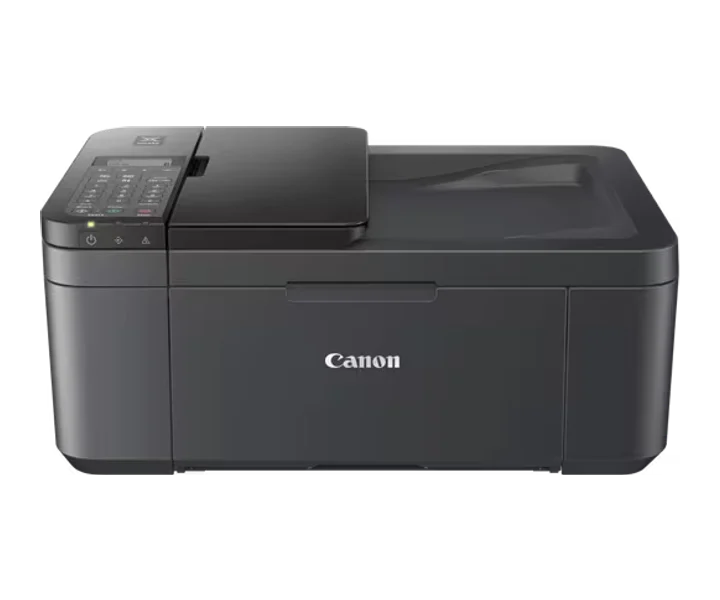 Canon PIXMA TR4755iPIXMA TR4755i |
|---|---|
| Güncel mağaza fiyatı | Güncel teklif yokFiyat tahmin edilmez.Mağaza tekliflerini gör ↗ |
| Üreticinin model / aile bilgisi | PIXMA TR4755iÜretici kaynağı ↗ |
| İşlevler | Wi-Fi, Print, Copy, Scan, Fax & CloudÜretici kaynağı ↗ |
| Baskı teknolojisi | 2 FINE Cartridges (BK, CL)Üretici kaynağı ↗ |
| Baskı hızının ölçüm koşulları | Mono Print Speed: Approx. 8.8 ipm; Colour Print Speed: Approx. 4.4 ipmÜretici kaynağı ↗ |
| Üreticinin belirttiği baskı çözünürlüğü | Up to 4800 x 1200 dpiÜretici kaynağı ↗ |
| Çift taraflı baskı yöntemi | Auto Duplex Print (A4, Letter - Plain Paper)Üretici kaynağı ↗ |
| Kenarlıksız baskı | Yes (A4, LTR, 4" x 6" (10x15cm), 5" x 7" (13x18cm), 8" x 10" (20x25cm))Üretici kaynağı ↗ |
| Uyumlu kartuş / toner / mürekkep | PG-575, PG-575XL (Black) CL-576, CL-576XL (Colour)Üretici kaynağı ↗ |
| Sarf malzemesi verimi | A4 colour documents printing Black: 100 pages Black XL: 400 pages Colour: 100 pages Colour XL: 300 pagesÜretici kaynağı ↗ |
| Desteklenen kağıt boyutları | Front Tray: A4, A5, A6, B5, LTR, LGL, 4""x6"" (10 x 15 cm), 5""x7"" (13 x 18 cm), 8""x10"" (20 x 25 cm), Envelopes (DL, COM10) [Custom size] width 101.6 mm - 215.9 mm, length 152.4 mm - 676 mm ADF: A4, LTR, LGLÜretici kaynağı ↗ |
| paper Types | Plain Paper Photo Paper Pro Platinum (PT-101) Photo Paper Pro Luster (LU-101) Photo Paper Plus Glossy II (PP-201) Matte Photo Paper (MP-101) Glossy Photo Paper ""Everyday Use"" (GP-501) High Resolution Paper (HR-101N) Envelope Photo Paper Plus Semi-gloss (SG-201), Canon Red Label Superior(WOP111) Canon Oce Office Colour Paper(SAT213) Restickable Photo Paper(RP-101) Magnetic Photo Paper(MG-101) Greeting Card (manufactured by Avery and RedRiverPaper)Üretici kaynağı ↗ |
| paper Weight | Front Tray: Plain Paper: 64 g/m2 - 105 g/m2 or supported genuine Canon papers Canon paper: Max. paper weight Approx. 300 g/m2 (Photo Paper Pro Platinum PT-101)Üretici kaynağı ↗ |
| Tarayıcı türü | Flatbed (ADF / Platen) CIS colour scannerÜretici kaynağı ↗ |
| Optik tarama çözünürlüğü | 600 x 1,200 dpiÜretici kaynağı ↗ |
| scan Speed Conditions | Colour: 3.5 ms/line (300 dpi) Greyscale: 1.5 ms/line (300 dpi)Üretici kaynağı ↗ |
| copy Speed Conditions | ESAT/Simplex ADF (colour): Approx. 2.7 ipm ESAT/Simplex ADF (black): Approx. 6.4 ipmÜretici kaynağı ↗ |
| fax Resolution | Mono: 8pels/mm x 3.85 lines/mm(Standard) 8pels/mm x 7.7 lines/mm(Fine) 300 dpi x 300 dpi (Extra Fine) Colour: 200 x 200 dpiÜretici kaynağı ↗ |
| fax | Super G3 / ColourÜretici kaynağı ↗ |
| first Page Time Conditions | Mono: 11 sec (ready/simplex) Colour: 19 sec (ready/simplex)Üretici kaynağı ↗ |
| supported Os | Windows 11, Windows 10、Windows 8.1、Windows 7 SP1 Operation can only be guaranteed on a PC with pre-installed Windows 7 or later. Display environment: XGA 1024 x 768 or more Mac: OS X 10.15.7 ~ macOS 14 Chrome OS Mobile Operating Systems: iOS®, iPadOS, Android™ *OS compatibility confirmed at time of launch, please check the Canon Download Centre for support of subsequently released OS’s for this product.Üretici kaynağı ↗ |
| display Type | Full dot LCD(Monochrome)Üretici kaynağı ↗ |
| noise Conditions | approx. 56.5dB(A)Üretici kaynağı ↗ |
| Güç kaynağı türü | AC 100-240V, 50/60HzÜretici kaynağı ↗ |
| Güç ve enerji koşulları | Off: Approx. 0.3W Standby (USB connection to PC): Approx. 0.8W Standby (all ports connected): Approx. 1.4W Time to enter Standby mode: 10 minutes 6 sec Copying: Approx. 7W *The wait time for standby cannot be changed (Lot26)Üretici kaynağı ↗ |
| Kasa ölçüleri | Approx. 435 x 295 x 189 Approx. 435 x 592 x 438Üretici kaynağı ↗ |
| Üreticinin ayrıntılı teknik tablosu | Functions: Wi-Fi, Print, Copy, Scan, Fax & Cloud · Print Resolution: Up to 4800 x 1200 dpi · Print Technology: 2 FINE Cartridges (BK, CL) · Mono Print Speed: Approx. 8.8 ipm · Colour Print Speed: Approx. 4.4 ipm · Photo Print Speed: Borderless 4" x 6" (10x15cm): Approx. 65 seconds · First-Print-Out Time: Mono: 11 sec (ready/simplex) Colour: 19 sec (ready/simplex) · Borderless Printing: Yes (A4, LTR, 4" x 6" (10x15cm), 5" x 7" (13x18cm), 8" x 10" (20x25cm)) · Two Sided Printing: Auto Duplex Print (A4, Letter - Plain Paper) · Standard Ink Cartridges: PG-575, PG-575XL (Black) CL-576, CL-576XL (Colour) · Cartridge Yield (Plain Paper): A4 colour documents printing Black: 100 pages Black XL: 400 pages Colour: 100 pages Colour XL: 300 pages · Paper Types: Plain Paper Photo Paper Pro Platinum (PT-101) Photo Paper Pro Luster (LU-101) Photo Paper Plus Glossy II (PP-201) Matte Photo Paper (MP-101) Glossy Photo Paper ""Everyday Use"" (GP-501) High Resolution Paper (HR-101N) Envelope Photo Paper Plus Semi-gloss (SG-201), Canon Red Label Superior(WOP111) Canon Oce Office Colour Paper(SAT213) Restickable Photo Paper(RP-101) Magnetic Photo Paper(MG-101) Greeting Card (manufactured by Avery and RedRiverPaper) · Maximum Paper Input: Front Tray: Max. 100 sheets (plain paper) or 20 sheets (photo paper) ADF: A4, LTR: 20 Sheets, LGL: 5 Sheets *Please refer to online manual for a detailed list of paper load limits, which will vary depending on media type and page size selected. · Paper Sizes: Front Tray: A4, A5, A6, B5, LTR, LGL, 4""x6"" (10 x 15 cm), 5""x7"" (13 x 18 cm), 8""x10"" (20 x 25 cm), Envelopes (DL, COM10) [Custom size] width 101.6 mm - 215.9 mm, length 152.4 mm - 676 mm ADF: A4, LTR, LGL · Paper Weight: Front Tray: Plain Paper: 64 g/m2 - 105 g/m2 or supported genuine Canon papers Canon paper: Max. paper weight Approx. 300 g/m2 (Photo Paper Pro Platinum PT-101) · Scanner Type: Flatbed (ADF / Platen) CIS colour scanner · Scanner Resolution (Optical): 600 x 1,200 dpi · Line Scanning Speed: Colour: 3.5 ms/line (300 dpi) Greyscale: 1.5 ms/line (300 dpi) · Scanning Depth (Input / Output): Colour: RGB each 16bit/8bit Greyscale: 16 bit / 8 bit · Maximum Document Size: Platen: A4/Letter (216 x 297 mm) ADF: A4/Letter/Legal (216 x 356 mm) · Copy Speed: ESAT/Simplex ADF (colour): Approx. 2.7 ipm ESAT/Simplex ADF (black): Approx. 6.4 ipm · Copy Quality: 3 positions (Draft, Standard, High) · Intensity Adjustment: 9 levels (automatic adjustment available, AE copy) · Multiple Copy: 99 copies (max.) · Copy Functions: Document Copying, Two-Sided Copy, 2-on-1 and 4-on-1 copy, Collated Copy (ADF only), Frame erase copy (Flatbed only), ID copy · Copy Zoom: 25 - 400% Fit to page A5 to A4, B5 to A4, A4 to A5 and A4 to B5 · Fax Type: Super G3 / Colour · Fax Resolution: Mono: 8pels/mm x 3.85 lines/mm(Standard) 8pels/mm x 7.7 lines/mm(Fine) 300 dpi x 300 dpi (Extra Fine) Colour: 200 x 200 dpi · Fax Speed: Mono: approx. 3 sec. Colour: approx. 1 min. · Modem Speed: maximum 33.6 kbps (Automatic fall back) · Print Size: A4, LTR, LGL · Fax Memory: Approx. 50 pages · Automatic Dialing: Coded Speed Dialing: Max. 20 locations Group Dialing: Max. 19 locations · Display Type & Size: Full dot LCD(Monochrome) · Display Languages: 32 Languages Selectable: Japanese, English (mm & inch), German, French, Italian, Spanish, Portuguese, Dutch, Danish, Norwegian, Swedish, Finnish, Russian, Ukrainian, Polish, Czech, Slovene, Hungarian, Slovakian, Croatian, Romanian, Bulgarian, Turkish, Greek, Estonian, Latvian, Lithuanian, Simplified Chinese, Korean, Traditional Chinese, Indonesian, Vietnamese · Standard Interface: Hi-Speed USB (B Port) Wi-Fi: IEEE802.11 b/g/n/ Wi-Fi Security: WPA-PSK, WPA2-PSK, WEP, Administration password Wireless LAN Frequency Band: 2.4GHz · Mobile Apps: Canon PRINT app Easy-PhotoPrint Editor app · Printer Features: Easy-PhotoPrint Editor Software Easy Layout Editor Software (Windows only) Canon Inkjet Smart Connect Software Creative Park app Cloud Link Canon Print Service Plugin (Android) Apple AirPrint Wireless Direct Mopria (Android) · Smart Assistant & Automation Support: Amazon Alexa™ Google Assistant™ · Supported Operating Systems: Windows 11, Windows 10、Windows 8.1、Windows 7 SP1 Operation can only be guaranteed on a PC with pre-installed Windows 7 or later. Display environment: XGA 1024 x 768 or more Mac: OS X 10.15.7 ~ macOS 14 Chrome OS Mobile Operating Systems: iOS®, iPadOS, Android™ *OS compatibility confirmed at time of launch, please check the Canon Download Centre for support of subsequently released OS’s for this product. · Minimum System Requirements: Windows: 1.5GB or more Note: for bundled software installation. The necessary amount of hard disk space required. · Software Included: Printer Driver IJ Printer Assistant Tool Easy-PhotoPrint Editor (download) · Dimensions (W x D x H): Approx. 435 x 295 x 189 Approx. 435 x 592 x 438 · Acoustic Noise Levels: approx. 56.5dB(A) · Recommended Operating Environment: 5-35°C 10-90%RH (no dew condensation) · Power Source: AC 100-240V, 50/60Hz · Duty Cycle: Up to 1,200 pages/month · Power Consumption: Off: Approx. 0.3W Standby (USB connection to PC): Approx. 0.8W Standby (all ports connected): Approx. 1.4W Time to enter Standby mode: 10 minutes 6 sec Copying: Approx. 7W *The wait time for standby cannot be changed (Lot26) · Typical Electricity Consumption: 0.21 kWh · footnote-1: Ink droplets can be placed with a pitch of 1/4800 inch at minimum. · footnote-2: A4 document print speed on plain paper is measured based on average of ESAT in Office Category Test of ISO/IEC 24734 standard. Photo print speed is based on the default setting using ISO/JIS-SCID N2 on Photo Paper Plus Glossy II and does not take into account data processing time on host computer. Print speed may vary depending on system configuration, interface, software, document complexity, print mode, page coverage, type of paper used etc. · footnote-3: A4 document print speed on plain paper is measured based on average of ESAT in Office Category Test of ISO/IEC 24734 standard. Photo print speed is based on the default setting using ISO/JIS-SCID N2 on Photo Paper Plus Glossy II and does not take into account data processing time on host computer. Print speed may vary depending on system configuration, interface, software, document complexity, print mode, page coverage, type of paper used etc. · footnote-4: A4 document print speed on plain paper is measured based on average of ESAT in Office Category Test of ISO/IEC 24734 standard. Photo print speed is based on the default setting using ISO/JIS-SCID N2 on Photo Paper Plus Glossy II and does not take into account data processing time on host computer. Print speed may vary depending on system configuration, interface, software, document complexity, print mode, page coverage, type of paper used etc. · footnote-5: A4 document print speed on plain paper is measured based on average of ESAT in Office Category Test of ISO/IEC 24734 standard. Photo print speed is based on the default setting using ISO/JIS-SCID N2 on Photo Paper Plus Glossy II and does not take into account data processing time on host computer. Print speed may vary depending on system configuration, interface, software, document complexity, print mode, page coverage, type of paper used etc. · footnote-6: A4 document print speed on plain paper is measured based on average of ESAT in Office Category Test of ISO/IEC 24734 standard. Photo print speed is based on the default setting using ISO/JIS-SCID N2 on Photo Paper Plus Glossy II and does not take into account data processing time on host computer. Print speed may vary depending on system configuration, interface, software, document complexity, print mode, page coverage, type of paper used etc. · footnote-7: Page Yield is the estimated value based on Canon individual test method using the ISO/IEC 24712 chart and continuous printing simulation with the replacement after initial setup. · footnote-8: Optical resolution is a measure of maximum hardware sampling resolution, based on ISO 14473 standard. · footnote-9: The fastest speed in Hi-Speed USB on Windows PC. Transfer time to computer is not included. · footnote-10: Copy speeds are the average of sFCOT and sESAT, ISO/IEC 29183. Copy speeds (ADF) are ESAT of copy in sequence, ISO/IEC 24735. Copy speed may vary depending on document complexity, copy mode, page coverage, type of paper used etc. and does not take into account warming up time. · footnote-11: Copy speeds are the average of sFCOT and sESAT, ISO/IEC 29183. Copy speeds (ADF) are ESAT of copy in sequence, ISO/IEC 24735. Copy speed may vary depending on document complexity, copy mode, page coverage, type of paper used etc. and does not take into account warming up time. · footnote-12: Black & white document fax transmission speed is based on default setting using ITU-T No.1 chart. Color document fax transmission speed is based on default setting using Canon Color Fax Test Sheet. Actual transmission speed may vary depending on document complexity, fax settings at receiving end, and line conditions etc. · footnote-13: Black & white document fax transmission speed is based on default setting using ITU-T No.1 chart. Color document fax transmission speed is based on default setting using Canon Color Fax Test Sheet. Actual transmission speed may vary depending on document complexity, fax settings at receiving end, and line conditions etc. · footnote-14: Page count is based on ITU-T No.1 chart or Canon FAX Standard Chart No.1. · footnote-15: Wireless printing requires a working network with wireless 802.11b/g/n capability, operating at 2.4GHz. Wireless performance may vary based on terrain and distance between the printer and wireless network clients.Üretici kaynağı ↗ |
| Diğer teknik bilgiler | footnote-16: Requires an Internet connection and the Canon PRINT Inkjet/SELPHY app, available for free on the App Store and at Google Play. Compatible with iPad, iPhone 3GS or later, and iPod touch 3rd generation or later devices running iOS 7.0 or later, and Android mobile devices running Android 2.3.3 or later. Your device must be connected to the same working network with wireless 802.11 b/g/n/a capability as your printer. Requires a compatible social media account and is subject to that social media accounts Terms of Service. Certain exceptions may apply. · footnote-17: The Easy-PhotoPrint Editor software requires an Internet connection and is compatible with the following operating systems; Microsoft Windows 10 (64-bit/32-bit), Microsoft Windows 8.1 (64-bit/32-bit), Microsoft Windows 7 SP1 (64-bit/32-bit), macOS High Sierra v10.13, macOS Sierra v10.12, Mac OS X El Capitan v10.11 and Mac OS X El Capitan v10.10.5. Minimum Windows and macOS/Mac OS X requirements are: 2GB of RAM and a monitor with 1024x768 resolution. The Easy-PhotoPrint Editor mobile application requires an Internet connection and the Easy-PhotoPrint Editor app v1.1.0, available for free on the App Store and at Google Play. Compatible with iPad Air2 (2nd Generation), iPad Mini 4 and iPhone 6s or later devices running iOS 10 or later, and Android mobile devices running Android 5.x or later. Certain exceptions may apply. The following file formats are supported: JPEG, PNG, HEIF (devices running iOS 11 and mac OS v10.13 or later), DLP save data, Poster Artist export data, EasyPhoto+ export data, Easy-PhotoPrint Editor export data. · footnote-18: Requires an Internet connection and the Canon PRINT Inkjet/SELPHY app, available for free on the App Store and at Google Play. Compatible with iPad, iPhone 3GS or later, and iPod touch 3rd generation or later devices running iOS 7.0 or later, and Android mobile devices running Android 2.3.3 or later. Your device must be connected to the same working network with wireless 802.11 b/g/n/a capability as your printer. Requires a compatible social media account and is subject to that social media accounts Terms of Service. Certain exceptions may apply. · footnote-19: The Easy-PhotoPrint Editor software requires an Internet connection and is compatible with the following operating systems; Microsoft Windows 10 (64-bit/32-bit), Microsoft Windows 8.1 (64-bit/32-bit), Microsoft Windows 7 SP1 (64-bit/32-bit), macOS High Sierra v10.13, macOS Sierra v10.12, Mac OS X El Capitan v10.11 and Mac OS X El Capitan v10.10.5. Minimum Windows and macOS/Mac OS X requirements are: 2GB of RAM and a monitor with 1024x768 resolution. The Easy-PhotoPrint Editor mobile application requires an Internet connection and the Easy-PhotoPrint Editor app v1.1.0, available for free on the App Store and at Google Play. Compatible with iPad Air2 (2nd Generation), iPad Mini 4 and iPhone 6s or later devices running iOS 10 or later, and Android mobile devices running Android 5.x or later. Certain exceptions may apply. The following file formats are supported: JPEG, PNG, HEIF (devices running iOS 11 and mac OS v10.13 or later), DLP save data, Poster Artist export data, EasyPhoto+ export data, Easy-PhotoPrint Editor export data. · footnote-20: Canon Print Service is a print plug-in for Android smart devices, which enables printing from Android v4.4 - v5.0 devices to many Canon printers via a Wi-Fi network. The plug-in does not work as a standalone app. Available for free at Google Play. · footnote-21: AirPrint functionality requires a compatible iPad, iPhone, or iPod Touch device running iOS 7.0 or later, and an AirPrint-enabled printer connected to the same network as your iOS device. A printer connected to the USB port of your Mac, PC, AirPort Base station, or Time Capsule is not supported. · footnote-22: Requires a smart device with the Canon PRINT Inkjet/SELPHY app installed and connected to the desired active wireless network to complete cableless setup. · footnote-23: Requires Android mobile device with Android 4.4 operating system or later with the Mopria Print Service pre-loaded with that device and the compatible PIXMA printer on the same wireless network. The Mopria experience is also available on Android 4.4 mobile devices with a download of the Mopria Print Service from Google Play. · footnote-24: Requires an active smart assistant account linked and accompanying app enabled, the smart device and printer to be actively connected with permission to the Canon Inkjet Cloud Printing Center, and the required action(s), skill(s), or applet(s) available/enabled to the compatible printer. Voice commands can not be displayed as text on Amazon smart devices with screens. Only English, French and German supported. · footnote-25: Requires an active smart assistant account linked and accompanying app enabled, the smart device and printer to be actively connected with permission to the Canon Inkjet Cloud Printing Center, and the required action(s), skill(s), or applet(s) available/enabled to the compatible printer. Voice commands can not be displayed as text on Amazon smart devices with screens. Only English, French and German supported. · footnote-26: Some functions may not be available with these Operating Systems. Please refer to the manual or website for details. · footnote-27: Plain Paper(A4, B/W). Acoustic Noise is measured based on ISO7779 standard. · footnote-28: Copy: When copying ISO/JIS-SCID N2 (printed by inkjet printer) on A4 size plain paper using default settings. · footnote-29: Typical Electricity Consumption (TEC) value: TEC value was calculated assuming the unit will be constantly switched among operational mode, sleep mode, and power-off mode for 5 days, and that it will be either in sleep or power-off mode for the remaining 2 days within the same week. The TEC value of this product is calculated by Canon on their own accord using TEC measurement procedure regulated in International ENERGY STAR Program.Üretici kaynağı ↗ |